Build a personal assistant app
In this tutorial you build a small but real AI app on LibraOS. People sign in with their LibraOS account and get an assistant that:
- chats with them, using the app's own agent;
- keeps their conversations, so they can list and resume them;
- answers from their documents, which nobody else can search, and stops when they delete one;
- remembers what they said, even in a brand-new conversation.
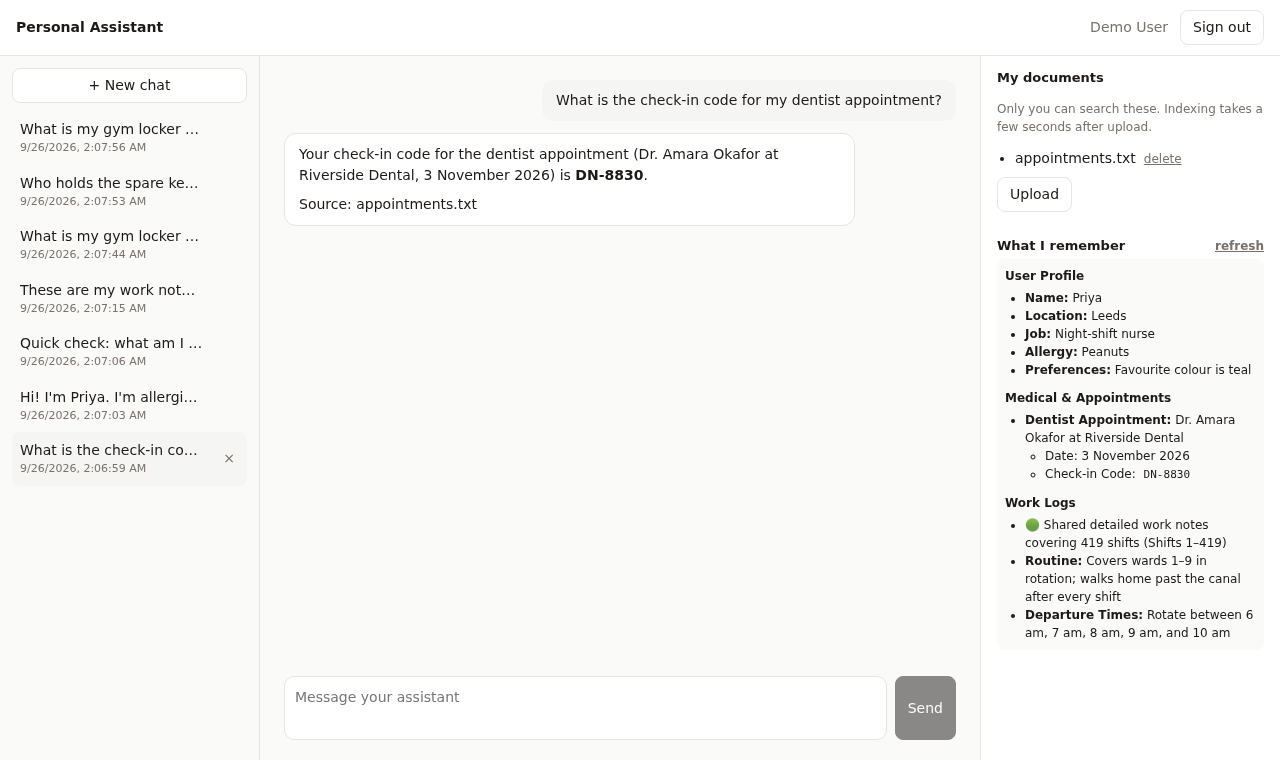
This is the L4 single-agent app in the Cookbook learning paths. For smaller exercises, start with Knowledge or Memory independently. The app has reported live checks on kernel v0.2.2; those checks do not certify every provider or the separate minimal recipes.
The runnable code lives in the
libraos/cookbook repository:
| Folder | Step |
|---|---|
get-started/ | 1: a LibraOS kernel on your laptop |
get-started/01-first-agent/ | 2: your first agent, from a script |
get-started/02-sign-in-with-libraos/ | 3: "Sign in with LibraOS" |
apps/personal-assistant/ | 4–8: the assistant app |
git clone https://github.com/libraos/cookbook
cd cookbook
It takes about 30 minutes. At the end you'll understand the pieces every LibraOS app is made of.
Prerequisites
- Docker with Compose v2
- Node.js 22.12+ (the common environment for the Cookbook web apps)
- A model endpoint, which can be either:
- a hosted OpenAI-compatible gateway and its key, or
- Ollama on your machine, for a fully local setup.
How the pieces fit
browser ──► your app ──► LibraOS kernel
             │              ├─ sign-in (OpenID Connect)
             │              ├─ your app's agent
             │              ├─ conversations, documents, memory — per user
             │              └─ models
             └─ every call carries the signed-in user's own token
The app has no backend of its own. The browser signs the user in and calls the kernel with their token, so the kernel scopes every answer to that person: their conversations, their documents, their memory. The app never runs as an admin.
Step 1 — Run a kernel locally
cd get-started
cp .env.example .env
In .env, set:
LIBRA_OS_JWT_SECRETto any long random string (openssl rand -hex 32);LIBRA_OS_ADMIN_PASSWORD;- the secret after
quickstart:admin=inLIBRA_OS_SERVICE_CLIENTS; - one model block;
PA_DEMO_PASSWORD(12+ characters) for the ordinary demo user;LIBRA_OS_EMBEDDING_API_BASEandLIBRA_OS_EMBEDDING_MODELfor document search. Use the API base without/v1; the Runtime appends/v1/embeddings.
Then start the kernel:
docker compose up -d
curl http://localhost:8900/health     # {"service":"libraos","status":"ok"}
The current Cookbook Compose file defaults to kernel v0.2.2 and runs
Postgres with pgvector. curl http://localhost:8900/api/version shows the actual
version. If you change LIBRAOS_PORT, also update the public URL, browser proxy
configuration and registered redirect URIs as described in the recipe README.
LIBRA_OS_PUBLIC_URLis required. Tokens name it as their issuer.- The container needs
ulimits: memlock: -1. The kernel refuses to start under Docker's default memory-lock limit. - The kernel uses three model tiers: answer, brain and skill. Point
OPENAI_MODEL,LIBRA_OS_BRAIN_MODELandLIBRA_OS_SKILL_MODELat a model your endpoint serves. If you don't, the startup log saysmodel preflight … FAILEDand chats hang.
Step 2 — Your first agent
./01-first-agent/first-agent.sh "Give me one tip for a productive morning."
The script does three things, and every LibraOS integration starts with them:
- Gets a token. It exchanges the laptop-only
quickstartclient's secret:POST /oauth/tokenwithgrant_type=client_credentials. - Creates an agent.
POST /v1/agentswith{"name":"first-assistant","agent_type":"persona","system":"…"}. - Chats.
POST /agents/v1/first-assistant/chatwith{"message":"…"}, which returns{response, conversation_id, model, …}.
first-agent.ts holds a two-turn conversation. It sends the whole
conversation in messages every turn, with the same conversation_id. When
you send messages, the chat route adds nothing stored; if you send a single
message with the conversation_id instead, it replays the thread's earlier
turns for you (see Continuing a conversation).
A conversation ID works only on the route of the agent that recorded it;
another agent's route answers 404.
quickstart:admin is a full-admin credential for your laptop. Real apps never
hold one. People sign in as themselves, which is the next step.
Step 3 — Sign in with LibraOS
Every LibraOS kernel is an OpenID Connect provider. Your app registers as a client, and people sign in on the kernel's own page. Your app never sees a password.
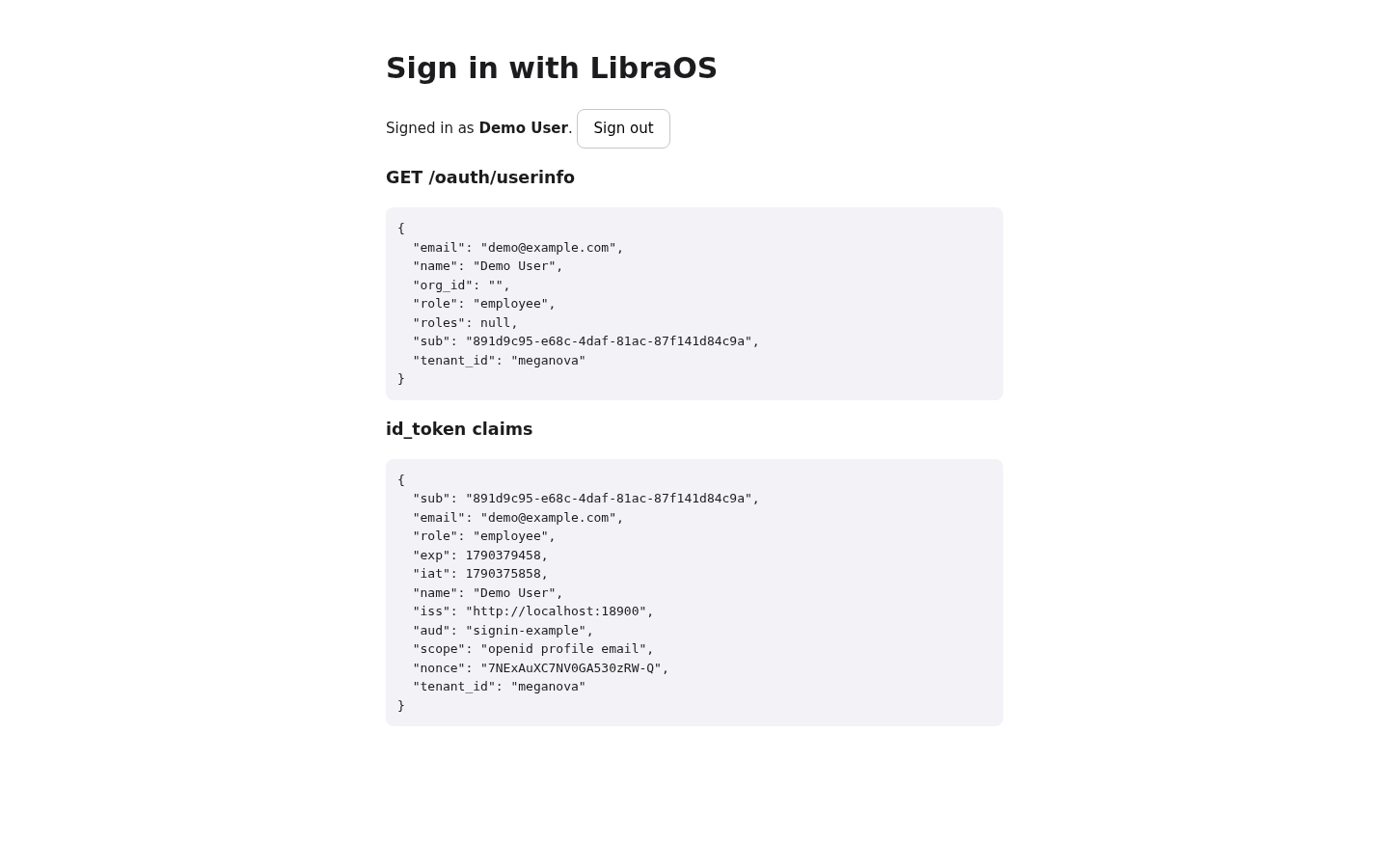
Register the app in the kernel's .env (one exact redirect URI per app;
PKCE is on by default). Preserve any other registered clients when updating
this list, then restart the kernel:
LIBRA_OS_OIDC_CLIENTS=signin-example=http://localhost:5173/callback,personal-assistant=http://localhost:5180/callback
The flow is in
02-sign-in-with-libraos/src/oidc.ts,
about 60 lines with no library:
- Redirect to
/oauth/authorizewith:client_idandredirect_uri;response_type=code;scope=openid profile email offline_access;state,nonce;- a PKCE
code_challengewithcode_challenge_method=S256.
- On
/callback, checkstate. ThenPOST /oauth/token, form-encoded, withgrant_type=authorization_code,code,client_id,redirect_uriand yourcode_verifier. - Call the kernel with
Authorization: Bearer <access_token>.GET /oauth/userinforeturns who the user is:sub,email,nameandroles. - Renew with
grant_type=refresh_tokenbefore the one-hour access token runs out. Refresh tokens rotate: each one works once.
Users are the kernel's. An admin of that kernel invites them, and one account works in every app registered on it. What someone may do inside your app is your app's decision, usually based on the kernel groups they belong to.
Step 4 — Package your agent as an app
An app is a folder the kernel installs. Your agent ships with your code rather than being created by hand:
apps/personal-assistant/libraos-app/
├── nova-app.yaml
└── agents/assistant.md
name: personal-assistant
version: 0.1.0
schema_prefix: pa_   # required even with no database migrations
agents: agents       # required: without it no agents load
---
name: assistant
description: A personal assistant that answers from the signed-in user's own documents and remembers what they tell it.
type: persona
knowledge_bindings: ["*"]   # search every collection the CALLER may read
tool_scope: none            # this assistant chats and retrieves; it calls no tools
---
You are a personal assistant for the signed-in user.
- Be concise and friendly. …
- Name documents by file name only, like this: "(from appointments.txt)". …
The frontmatter configures the agent and the body is its system prompt.
knowledge_bindings: ["*"] means "search whatever the caller may read".
For a normal user, that's only their own uploads.
Start the kernel with the app folder mounted at its apps root (the cookbook's compose file already does this; for plain Docker see Installing apps). From the Cookbook repository root, install the app and create a demo user:
apps/personal-assistant/scripts/setup.sh
# app: personal-assistant 0.1.0, 1 agent(s)
# user: created demo@example.com
setup.sh calls POST /v1/apps/personal-assistant/install, which is
admin-only and re-reads the agents. It then invites the demo user through
POST /api/admin/users/invite, and accepts the invitation with the password
you set in PA_DEMO_PASSWORD. Re-run it after you edit assistant.md.
Run the web app:
cd apps/personal-assistant/web
npm install
npm run dev     # http://localhost:5180 — sign in as demo@example.com
Step 5 — Chat as the user
const res = await authFetch(`/v1/apps/personal-assistant/agents/assistant/chat`, {
  method: "POST",
  headers: { "content-type": "application/json" },
  body: JSON.stringify({ messages, conversation_id: conversationId ?? undefined, stream: true }),
});
// → server-sent events, one JSON object per `data:` line
With "stream": true the reply arrives as it's written. Each event has a
type:
type | Carries |
|---|---|
text | the next piece of the reply, in content |
content | the whole reply again, once, at the end |
error | why the turn failed, in error (a done still follows) |
done | conversation_id, cited_sources, grounding, usage |
The app reads the body with fetch and a stream reader. EventSource won't
do here: it can't POST or send a bearer token. It appends each text,
treats content as the final text (append it too and you'd double the
answer), and takes conversation_id from done.
authFetchadds the user's token, and refreshes it once on a 401.- Send the whole conversation every turn. Because the app sends
messages,conversation_idonly says which thread to save the turn into. - Replies are Markdown. The app renders them with
react-markdownas they grow; it never injects raw HTML. - Streamed turns count as much as any other. They're saved to the
conversation and to the user's memory (Step 8). Leave out
streamand you get the whole reply as one JSON object instead:{response, conversation_id, cited_sources, …}.
Step 6 — Conversations
The kernel already stores every turn per user, so the app only needs to list and reopen them:
| Call | |
|---|---|
| List | GET /v1/conversations?agent=assistant |
| Open | GET /v1/conversations/:id (includes messages) |
| Rename | PATCH /v1/conversations/:id with {title} |
| Delete | DELETE /v1/conversations/:id |
New conversations are untitled, so the app names each one after its first question. To resume, load the stored messages and send them all with the next question.
Step 7 — Their documents
const form = new FormData();
form.append("file", file);
await authFetch("/api/documents/upload/my-documents", { method: "POST", body: form });
- Uploads are private by construction. For a normal user the kernel stores the file under their own folder and indexes it into a collection only they can read, whatever the request asks for. Ask the same question as another user and the assistant says it doesn't know.
- Indexing is off by default. The cookbook's compose file sets
LIBRA_OS_SUPERNOVA_ENABLED=true. Without it, files are stored but never searchable. - The v0.2.2 Cookbook setup supports semantic search in Postgres with
pgvector. Configure the embedding endpoint and model before uploading.
Allow time for indexing, check
/api/capabilities, and inspect the response's grounding and retrieved documents. An upload response alone does not prove its content is searchable.
Listing and deleting are one call each:
await authFetch("/api/documents/tree/my-documents");                 // → { files: [{ name }, …] }
await authFetch(`/api/documents/rm/my-documents/${encodeURIComponent(name)}`, { method: "DELETE" });
- Delete with
/api/documents/rm/…. It removes the file and its indexed text, so a new conversation can no longer answer from it. The kernel also hasDELETE /api/documents/file/…, which removes only the file and leaves its text searchable. - Deleting a file doesn't touch memory. If the user asked about the file in a chat, the assistant may recall that answer later from memory, without searching any document. A fact that was only ever in the file is gone.
Step 8 — Memory
The Cookbook Compose file enables LIBRA_OS_OBSERVATIONAL_MEMORY=1.
To check recall, teach the assistant a unique synthetic preference, start a new
conversation, and ask for it without supplying the old messages. Then repeat as
another ordinary user and check that the preference is not exposed. Recall is
model-dependent; an enabled setting alone is not a successful evaluation.
The minimal Memory recipe
also checks access to the stored conversation separately from model recall.
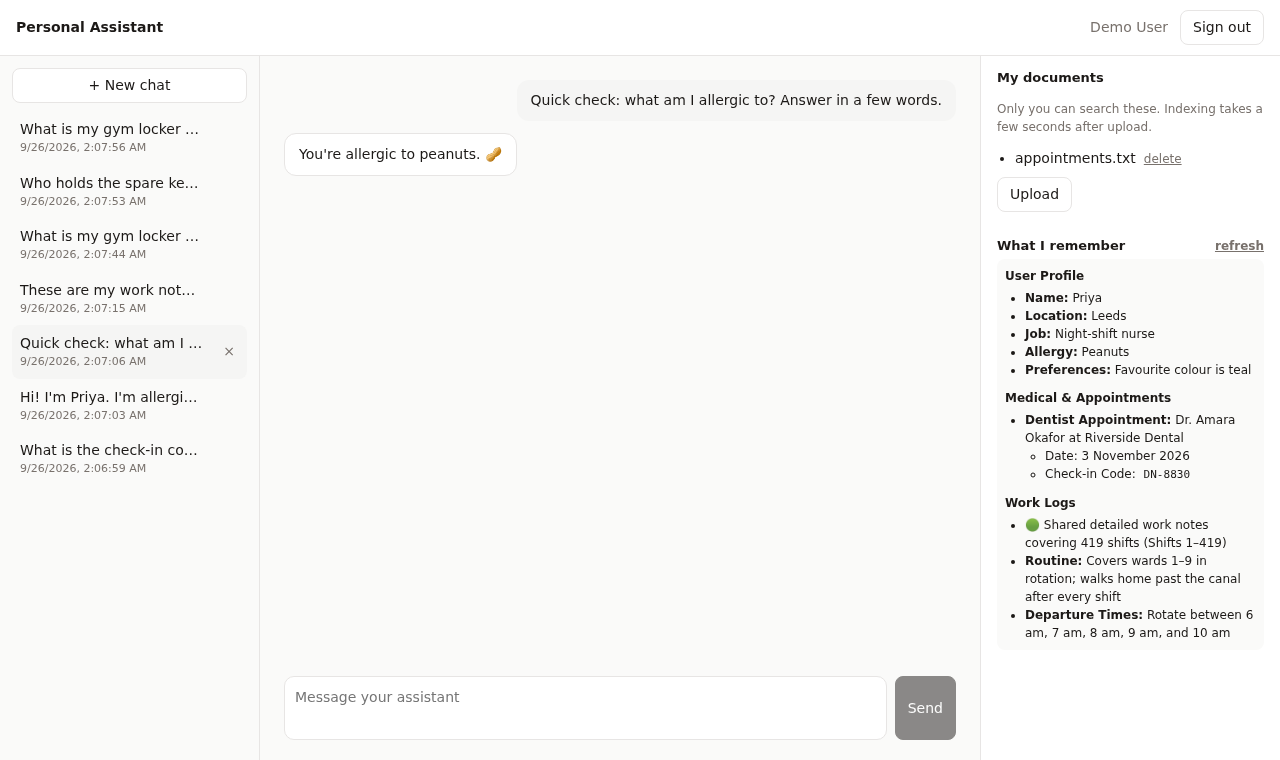
Once enough has been said, the kernel condenses it into notes. The app shows
them with GET /v1/managed/memory?agent_id=assistant, which returns only the
caller's own memory. Recall works before the notes appear.
Taking it to production
- Serve the app and the kernel from one origin, behind one reverse proxy. The cookbook does this in development with Vite's proxy. It keeps sign-out's redirect back to your app working.
- Register your production redirect URI, and keep PKCE on.
- Never ship an admin credential to the browser. Everything the app does runs as the signed-in user.
- Choose where the app runs:
- on the same kernel as your other apps, if they serve the same organisation;
- on its own kernel, if it serves a different customer or audience. On one kernel, users, admins and connectors are shared.
- Check permissions on every request. For actions only some people may
take, ask the kernel which groups the user belongs to
(
GET /v1/managed/groups/mine) and deny by default.
What isn't there yet
These features were left out on purpose. The cookbook README has the details for each.
- The user's own Gmail or calendar. Connectors are organisation-wide today.
- Acting on the user's behalf with their approval. This app has no side-effecting tools or approval flow. Verify the selected Runtime's approver roles and action policy before adding one. Tool Action Approval and Mission Decisions are separate contracts.
- Scheduled tasks, such as a daily briefing.
- Seeing or deleting memory item by item. The user sees the condensed notes, but can't remove one. That includes what the assistant learned in a chat about a document they have since deleted.
Next steps
- Creating an agent: everything an agent definition can say.
- Workspaces & memory and Managing memory: what persists, and for whom.
- Knowledge & retrieval: configure embeddings and verify the active retrieval backend.
- Customer support agent: a production guide with tools, escalation and evaluation.